Your Step-by-Step Bed Bug Heater Setup Guide
Your heater does the hard work, but it needs the room to be ready first. If you have not yet finished preparing for heat treatment, do that before you start. It covers sealing heat leaks, opening up furniture, and removing anything that could be damaged. Once the room is ready, the steps below take you from setup to shutdown: arranging the equipment, connecting the heater and fans, watching the temperature, and cooling down safely.
Get a Quote1. Setting Up the Heater and Fans in a Single Room
In a small bedroom, put the air-moving fans in any open space near the bed and move the furniture slightly away from the walls, so the air can travel around it. In a larger room, set the fans up so the air moves in a loop, much like the inside of a convection oven, which keeps the heat even from corner to corner.
Point one fan toward the closet so the air is shared between the closet and the room, since closets are often one of the coolest spots. Leave plenty of clearance around the heater, and keep electronics out of its direct path. Expect to adjust the fans as the treatment goes on, especially if the thermometer shows a cool spot.
Get a Quote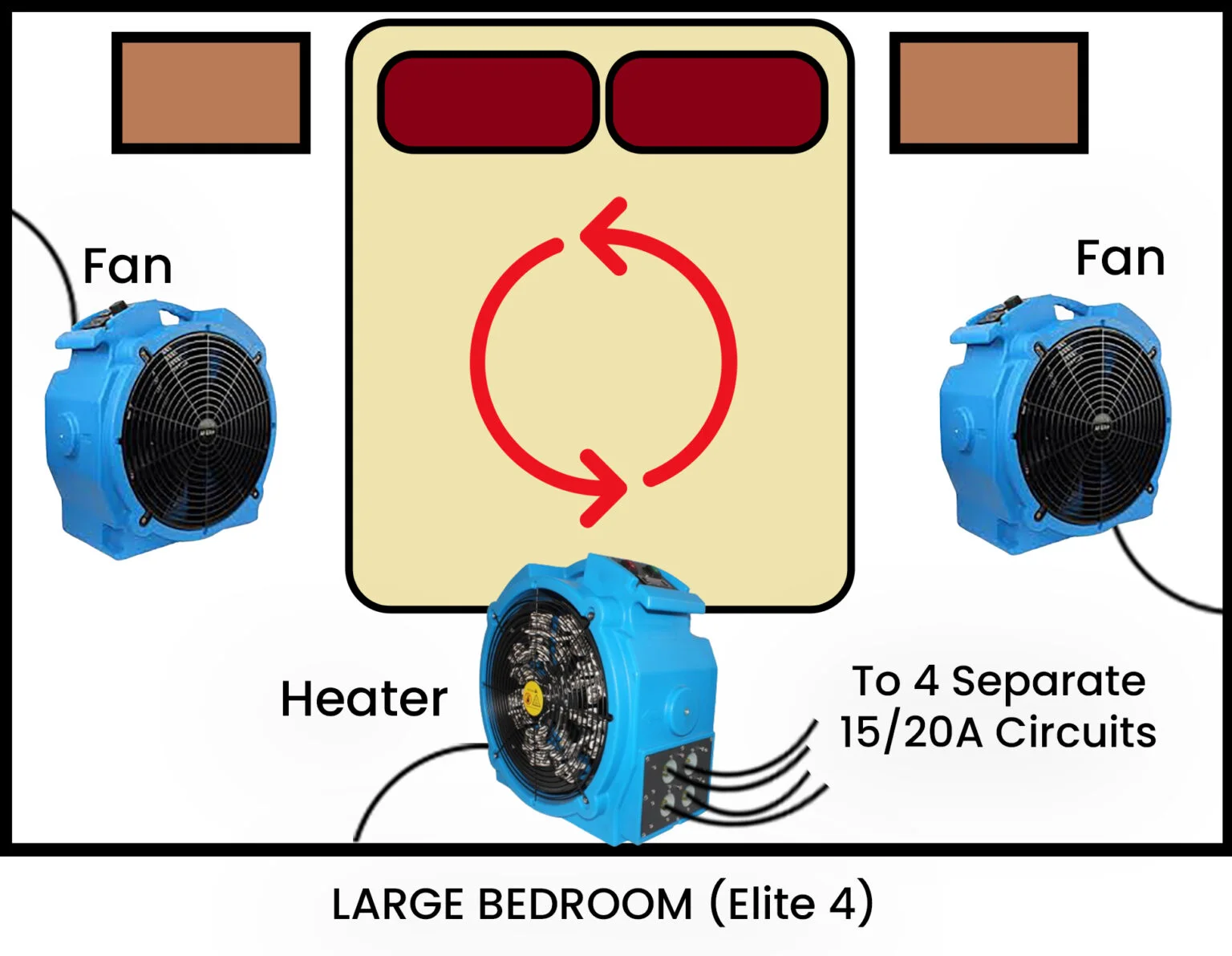
2. Setting Up for Several Rooms or a Whole House
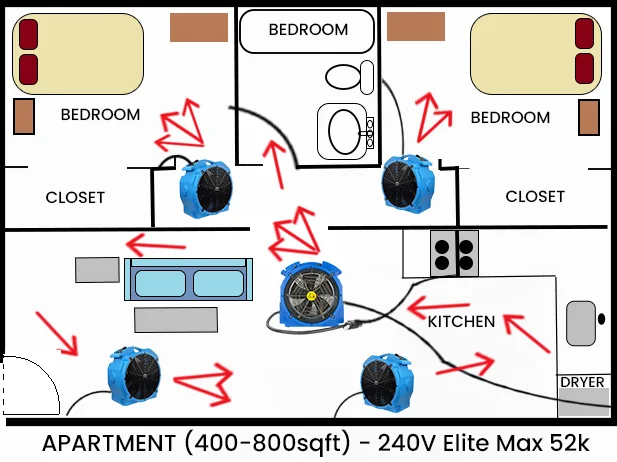
When you are treating more than one room, put the heaters and air movers in the middle of the space, so the air travels in a loop, a bit like a racetrack. Then add extra fans at doorways and hall entries to push the hot air into each room.
Call : (346) 250-1105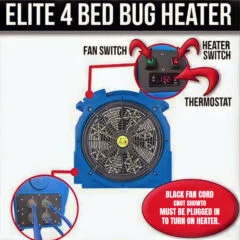
3a. Connecting the Heater for Small Spaces (Elite 4 Model)
Each blue heating element cord draws about 12 amps, so the way you plug it in matters.
- Plug the black power and fan cord into any wall outlet in the room.
- Insert the four blue element cords into the ports on the side of the unit.
- Run the blue cords under the door and plug each one into a separate 15 or 20 amp circuit, for example in the bathroom, living room and kitchen.
- Use only one cord per circuit, so you do not overload a breaker.
- The elements work independently, so you do not have to use all of them.
3b. Connecting the Heater for Larger Areas (VersaPro Model)
- Standard 110V Outlets: the VersaPro runs the same way as the Elite 4 and covers up to 400 square feet.
- 220V, Full Power: connect both large black cords to a 40 amp stove outlet using the Y adapter. This adds roughly 500 more square feet of heating capacity.
- 220V, Half Power: plug a single large black cord into a dryer outlet or a hotel air conditioner outlet. This adds roughly 250 more square feet.
- Mix and Match: any combination of heating elements can run at the same time, so you can use the outlets you have available.
4. Plugging in the Air-Moving Fans
Connect the fans to any available outlets. They use very little power, so they will not overload your circuits.
5. Turning on the Equipment
Check that every connection is secure. Switch on the air-moving fans first, then the heater. The thermostat is already set to 135°F.
6. Watching the Heat Build
This is the longest stage, so check in regularly.
- Look for tripped breakers. If a 15 or 20 amp breaker trips, two blue element cords are probably on the same circuit. Move one cord to a different circuit and reset the breaker.
- Expect some patience. Reaching target temperatures usually takes 7 to 12 hours, depending on room size and building structure.
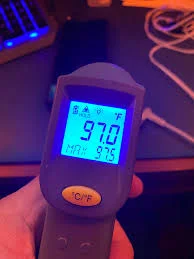
- Measure everywhere. Use the laser thermometer all around the room, including inside drawers, under piles of clothes, behind furniture and inside closets.
- Move the air. Turn fans toward any cooler spots.
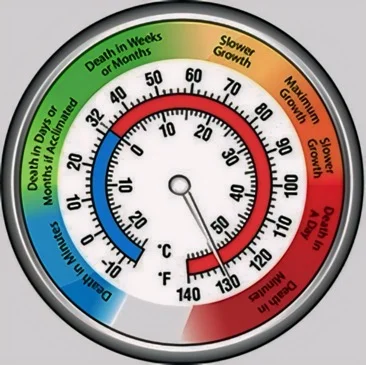
- Aim for 120°F in every spot. This often takes 15 to 20 hours. Once the whole space is there, keep heating for at least four more hours.
Note: Large items such as beds, and the spaces inside walls, take longer to heat. Do not switch the system off early, since a rushed treatment is the main reason heat treatments fall short.
7. Making Sure the Heat Reaches Everything
To help the heat get into every hiding spot, shake out piles of clothes, separate stacked items and shift furniture now and then. This opens up places the hot air could not reach before.
8. Before You Shut Down
While the room is above 120°F, use the time to chase down any remaining cool spots. Move clothes around, separate stacked objects, and adjust the furniture. Some people even stand a bed on its edge in an A shape so the heat gets underneath. Bed bugs exposed to 130°F die quickly.
The room is extremely hot at this stage, so take real care, protect your hands and keep going slowly. Doing this is your own responsibility.
9. Cooling Down and Finishing Up
- Press the red buttons to turn off the heating elements first, and only then switch off the fan.
- Let the room cool down gradually. Open the windows a little at a time over several hours, so your belongings are not shocked by a sudden drop in temperature. If you would like to use air conditioning or extra ventilation, wait until the room is under 100°F where you can.
- Unplug everything and pack up the equipment, with the cords neatly wrapped. If we are collecting it, leave it all by the front door.
- Give it several hours before you power up any electronics.
- When the room has fully cooled, clean the area and wash all clothes, linens and bedding on high heat.
- A residual bed bug spray is optional, though some people add one for extra protection.
You are never on your own with this. Please contact us at any point during your rental for help with setup, circuits or temperatures, and for an estimate if you are still deciding on a package.